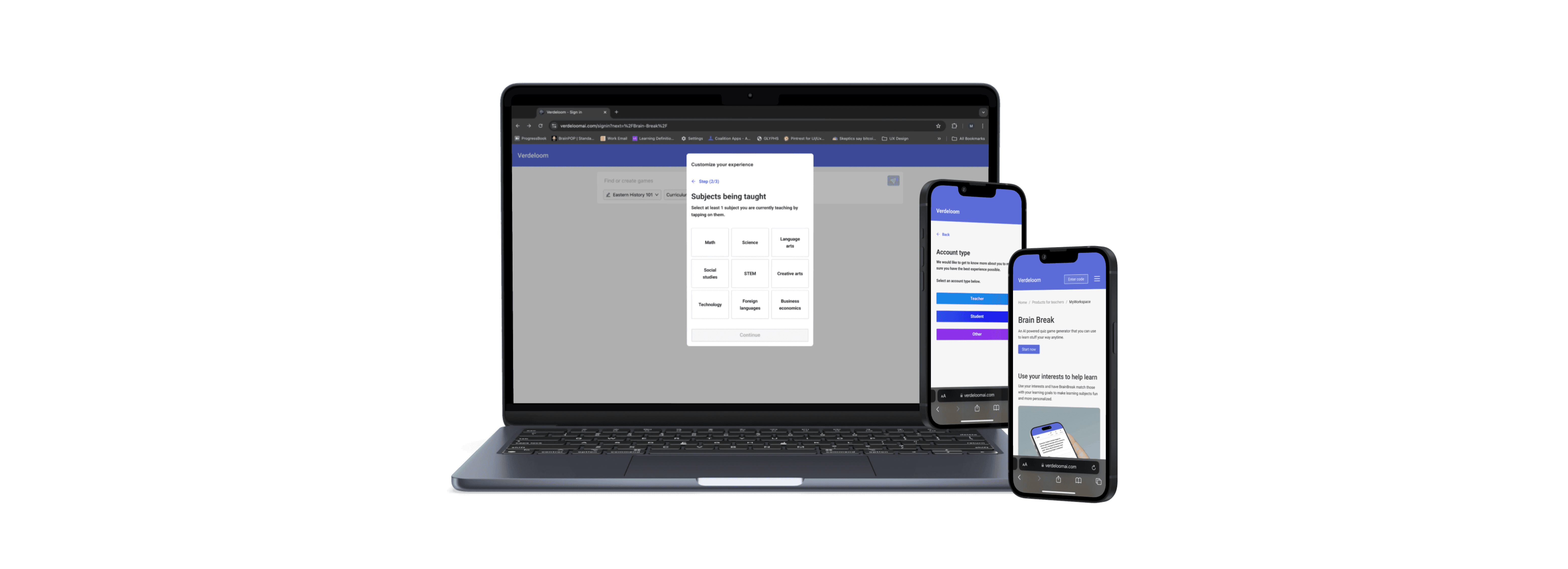
OVERVIEW
VerdeloomAI needed a redesigned marketing website that handled onboarding new customers and users to their platform for a personalized experience using their AI tools.
YEAR
2024
TEAM
1 Founder · 1 Engineer · 1 UX designer (Me)
ROLE
UX Designer
CONTEXT
VerdeloomAI is an AI-powered edtech startup offering a prompt-based quiz generator for interactive learning as one of their tools. Their current onboarding experience saw concerning bounce rates and lacked important data collection needed for a personalized experience using their AI tools.
PROBLEM
Business goal
Reduce onboarding bounce within flow, increase plan purchases, and capture key data to enable seamless integration into AI personalization.
Problem
Redesign onboarding to support different account types and capture key data for AI personalization without increasing bounce and creating burnout.
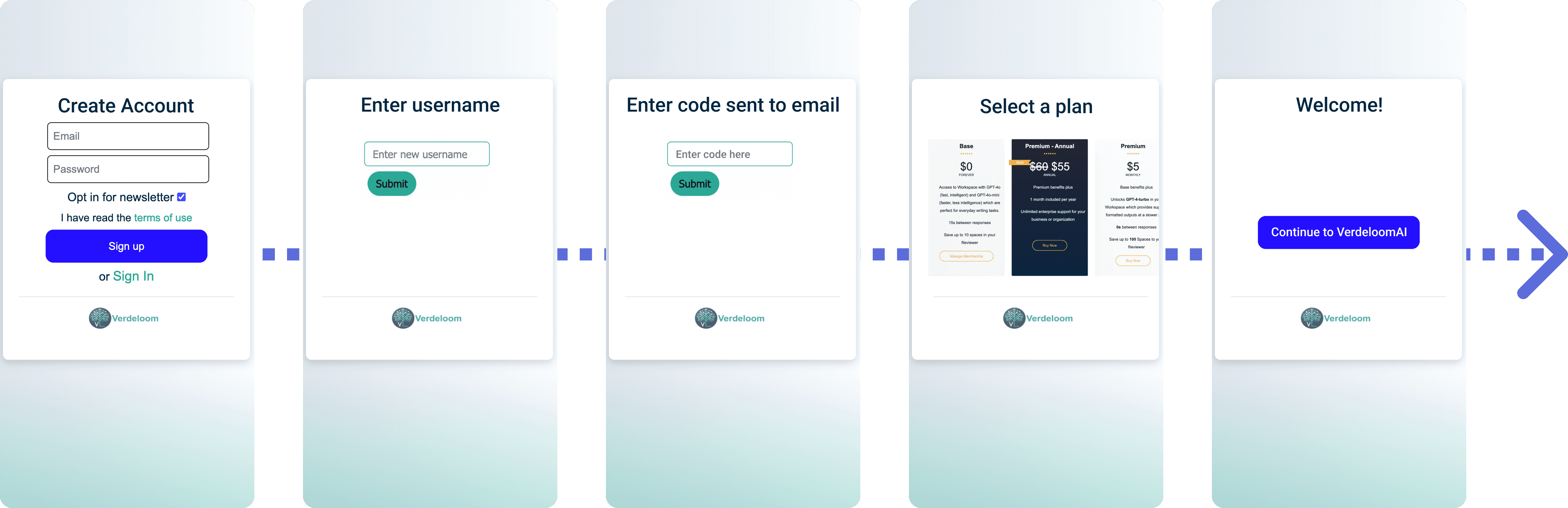
PREVIOUS EXPERIENCE (MOBILE)
RESEARCH PROCESS
How do teachers, students, and self-learners use AI for learning, how do they personalize their experience, and how can onboarding best balance AI capabilities with user needs?
Analytics
Conducted a survey to understand how users interact with AI and quiz tools, while also investigating how they personalize their experience.
Market research
Conducted a heuristic evaluation of competitors and Verdeloom to identify best practices and common onboarding patterns.
Usability testing
Led moderated usability testing of current and new designs to identify pain points and refine customer onboarding expereince.
INSIGHTS
What do users want from a quiz tool to make it easier for them to use?
In a survey conducted with 70 people (40 teachers + educators) and (30 students).
· Account for different learning styles
· Different formats for education levels
· Ability to adapt for different interests and subjects
What do people currently think about the onbaording experience?
User testing with current onboarding revealed that there were major issues that could be impacting bounce such as a feeling of a lack of security citing not trusting designs that seem low-quality, no way to go back within onboarding, and difficulty seeing plan info.
Blurred for confidentiality
(80% n=10) Thought onboarding didn't seem secure because of the design being low quality.
(70% n=10) Mentioned having an issue with no clear way to navigate back to previous steps.
Majority had difficulty viewing plan information (using images that are too small)
Who are potential users?

Teachers/educators
Teachers who are using a quiz game as a way to test knowledge on a subject or support learning plan.

Students
Studying a subject in class, outside of class or using to explore interested topics that aren't related to school.

Independent learners
Students not formally enrolled in education or people interested in a topic to learn. Majority interested in language and geography.
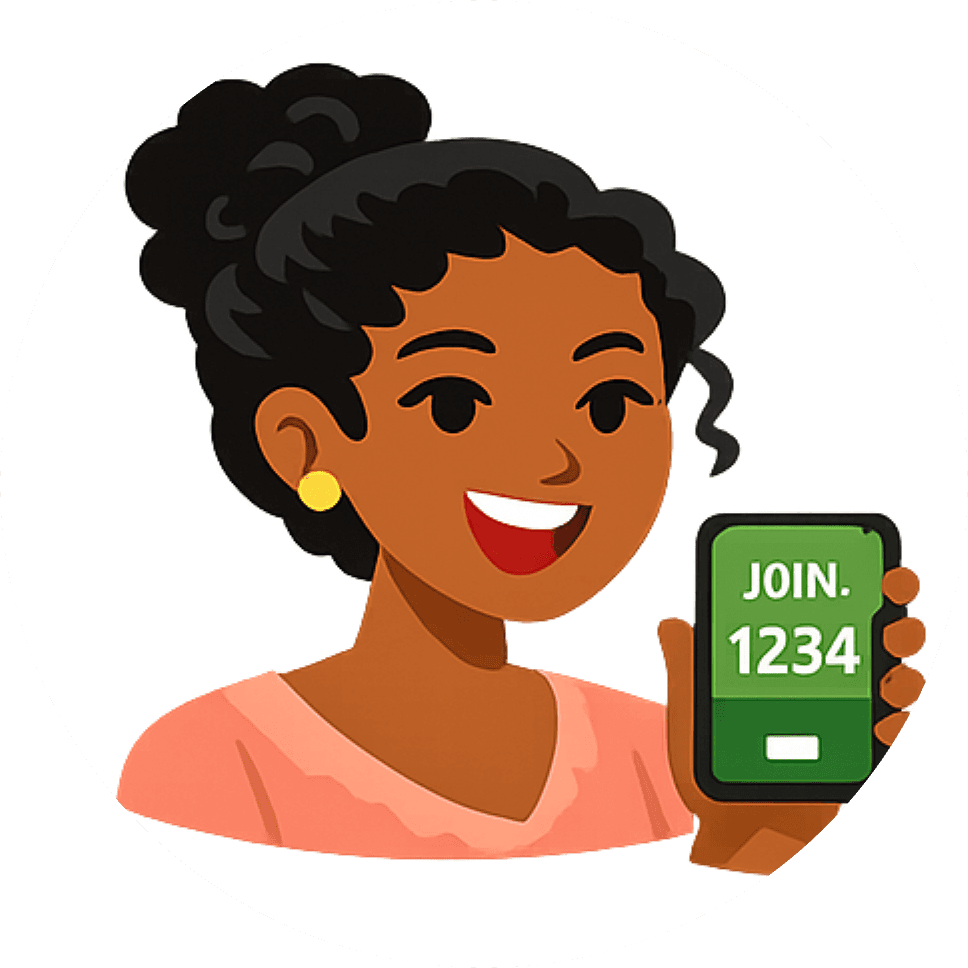
Invited to play games via code
Students or others that were shared a code to a quiz by someone else that want to learn a specific subject.
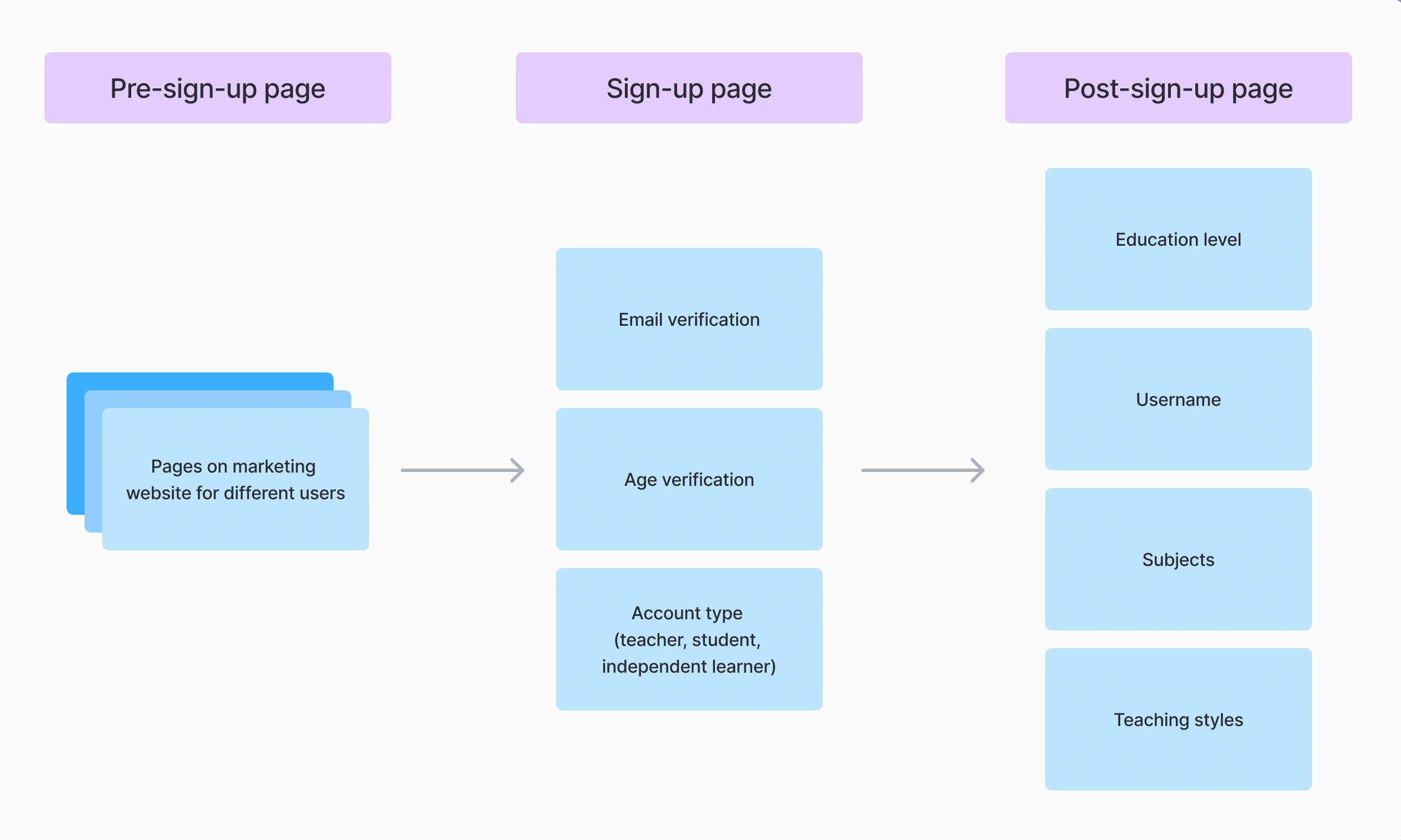
Onboarding extends beyond the sign-up page
Market research showed onboarding often begins with funnel driven sign-up flows or dedicated sign-up pages. Age verification is standard for compliance, while personalization is typically deferred to a dismissible post-sign-up modal.
Key findings
Personalization shouldn't tie up onboarding
Interestingly enough, the average steps for onboarding was between 4-6 steps. Personalization usually didn't come until after initial onboarding to prevent drop-off.
Age verification flow is a must
Since we were designing for students K-12 it is a must to ensure we are adhering to local laws. if 13 years or younger go into a parent account flow.
Adapt questions based on account type
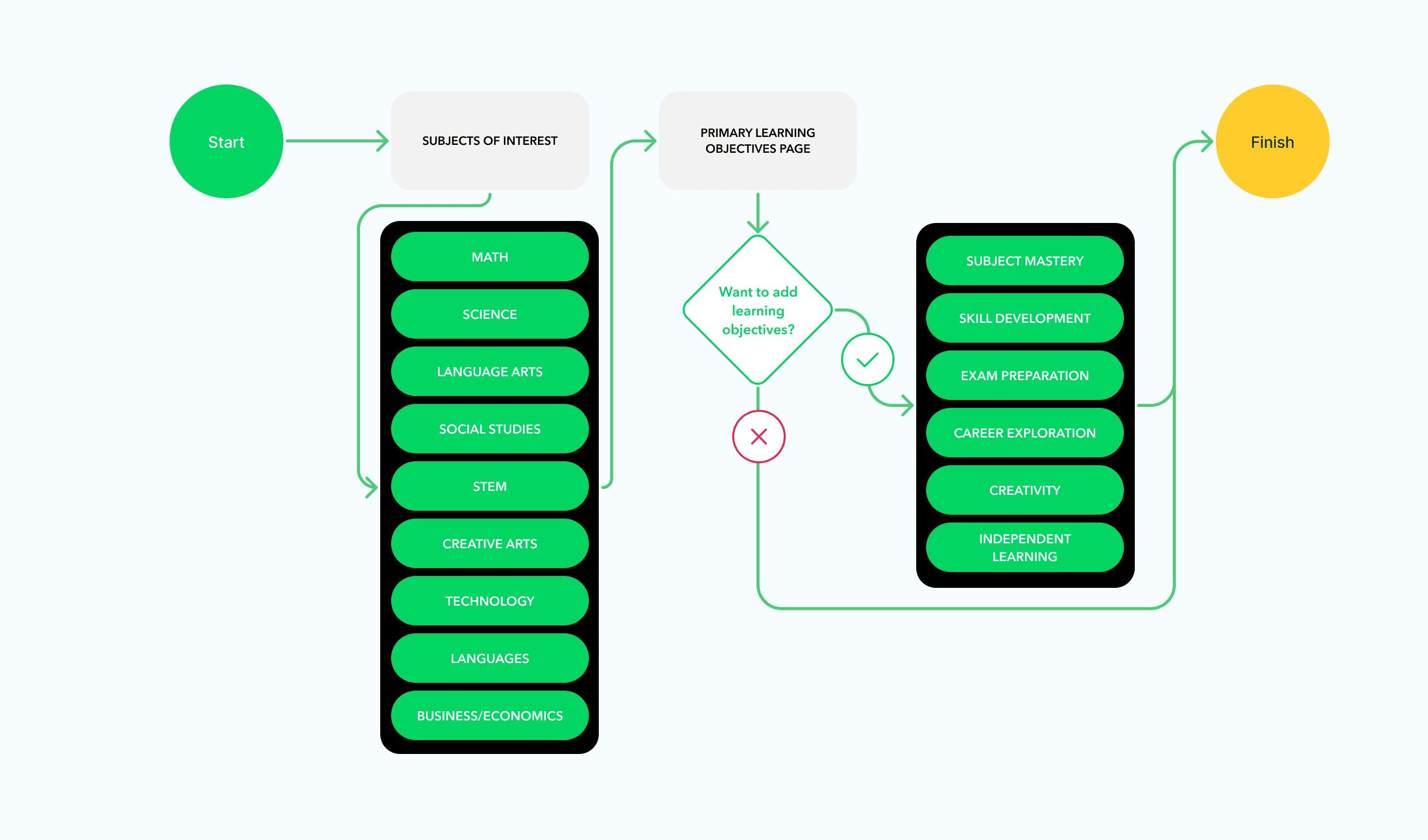
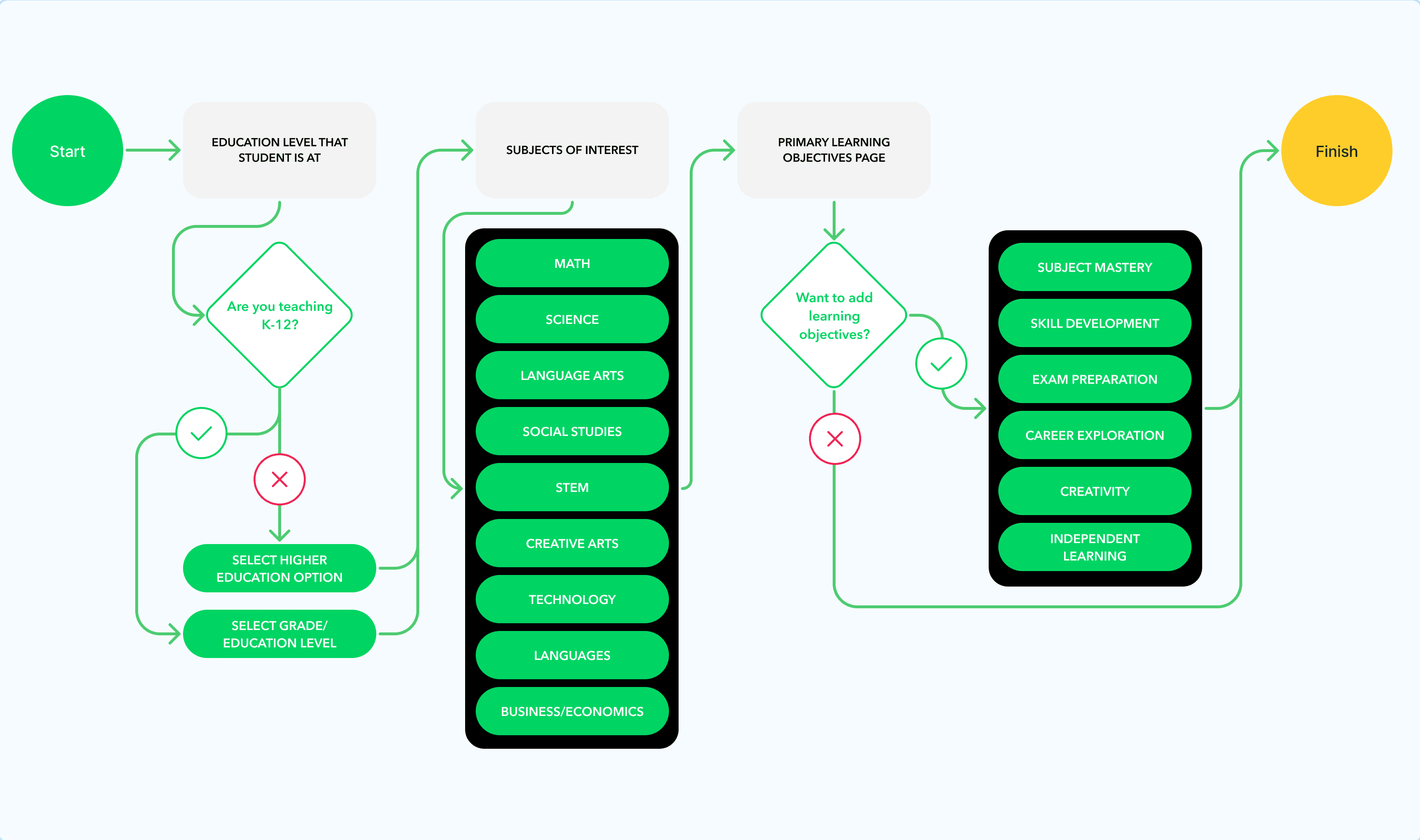
Adjusting personalization questions is very useful when making an account as a teacher vs a student. Focus should be on (teaching styles, subjects, education level).
Friction driven by trust and usability issues
Being able to look visually appealing, being able to easily view plans and navigate around the onboarding flow is a must for customers.
SOLUTION
Created an onboarding experience that encapsulates all types of users and helps give Vedeloom's AI tools the info they need to create a high-quality personalized learning experience.
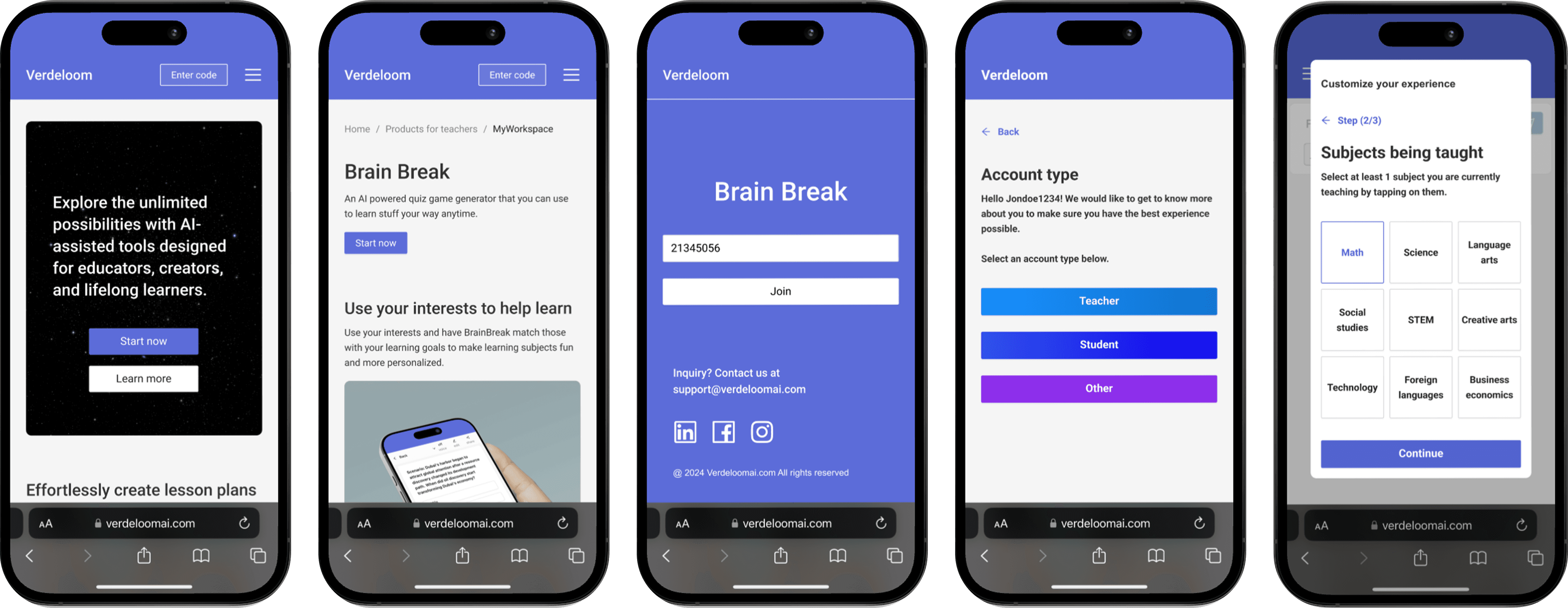
Easy access for users joining a game
Brain Break quizzes served as a primary onboarding entry point, enabling fast code-based access and reducing friction for first time engagement, with prominent placement in top navigation.
Driving engagement through strategic entry points
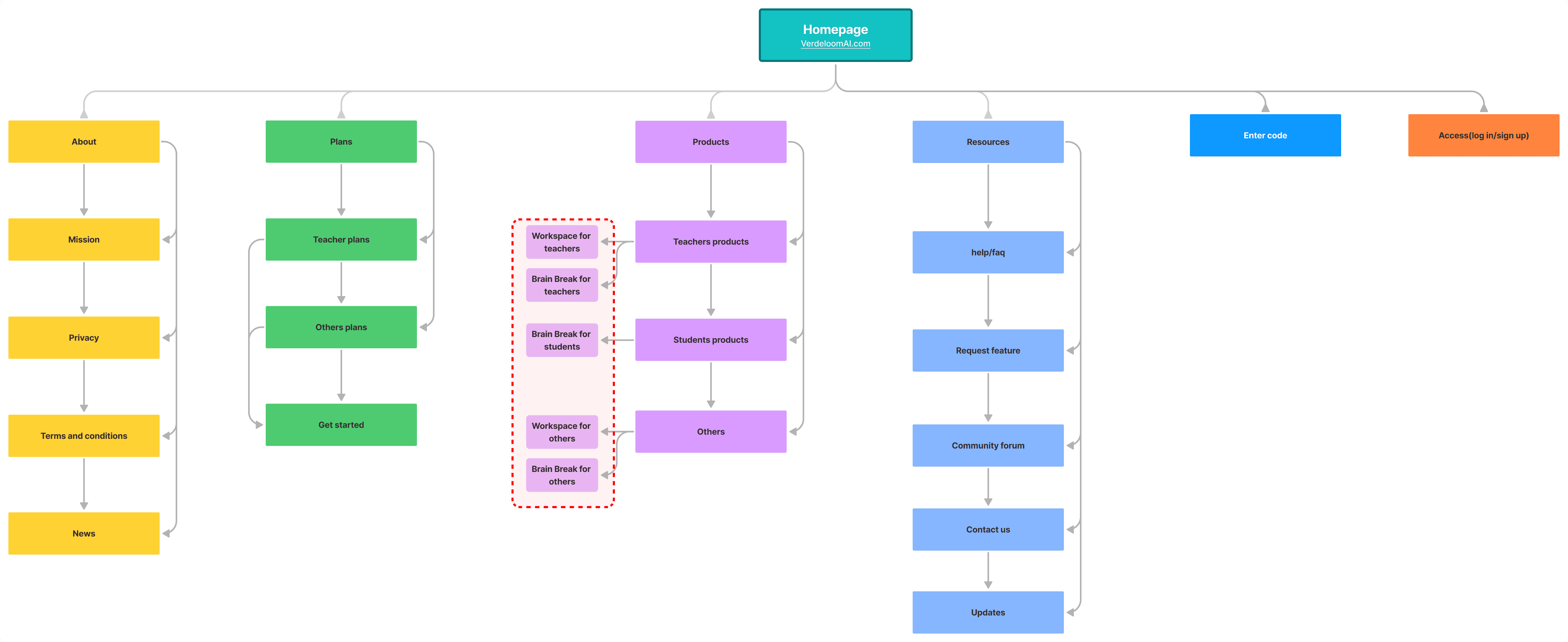
Designed for multiple entry points to boost onboarding engagement through navigation access and contextual entry points on the website.
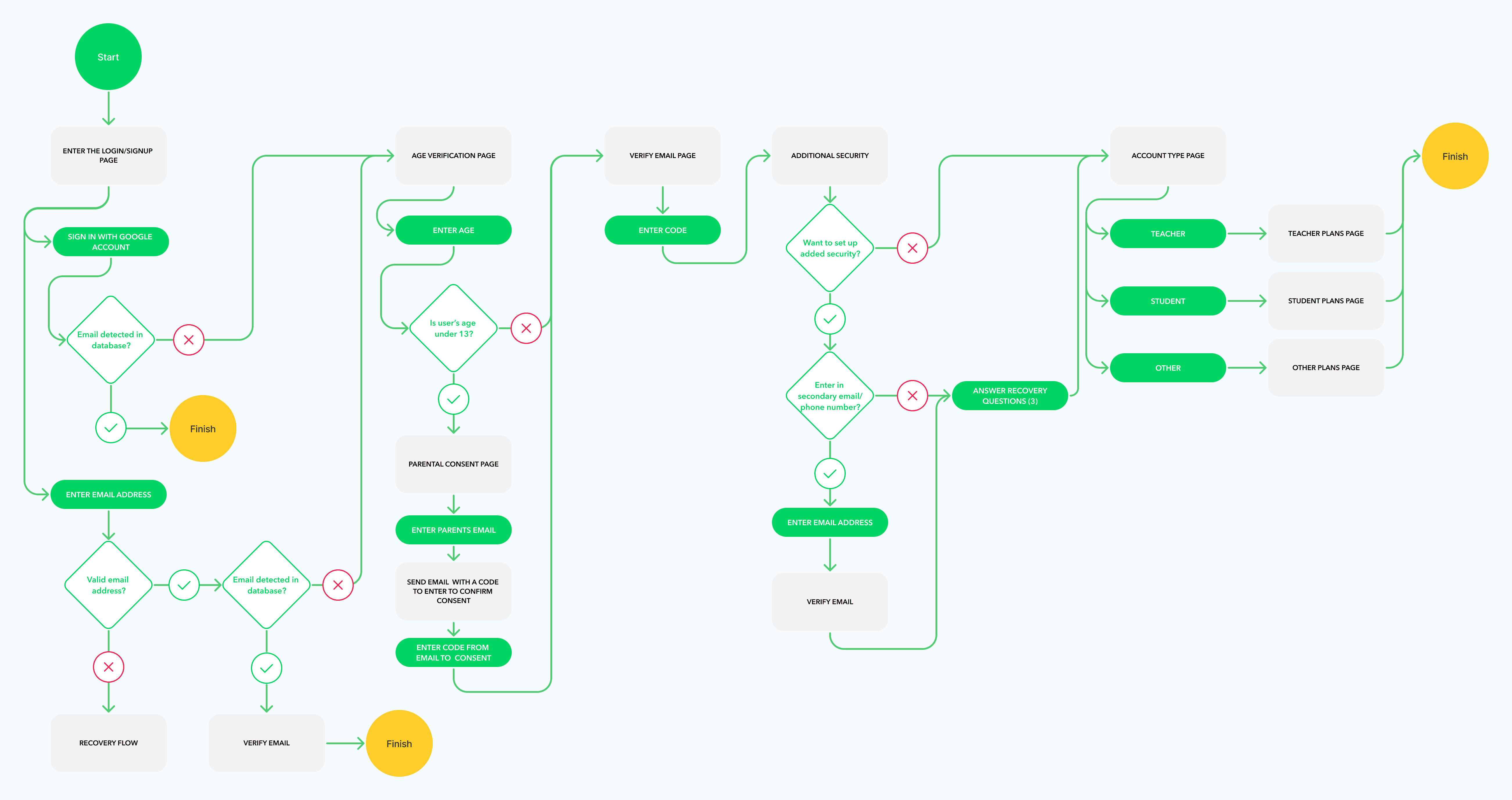
Main onboarding (email, age, account type)
Focused sign-up section on essentials: (email + age verification, account type, and plan selection) to reduce time to tool access and lower bounce. Account type also enabled tailored messaging on the plan selection page.
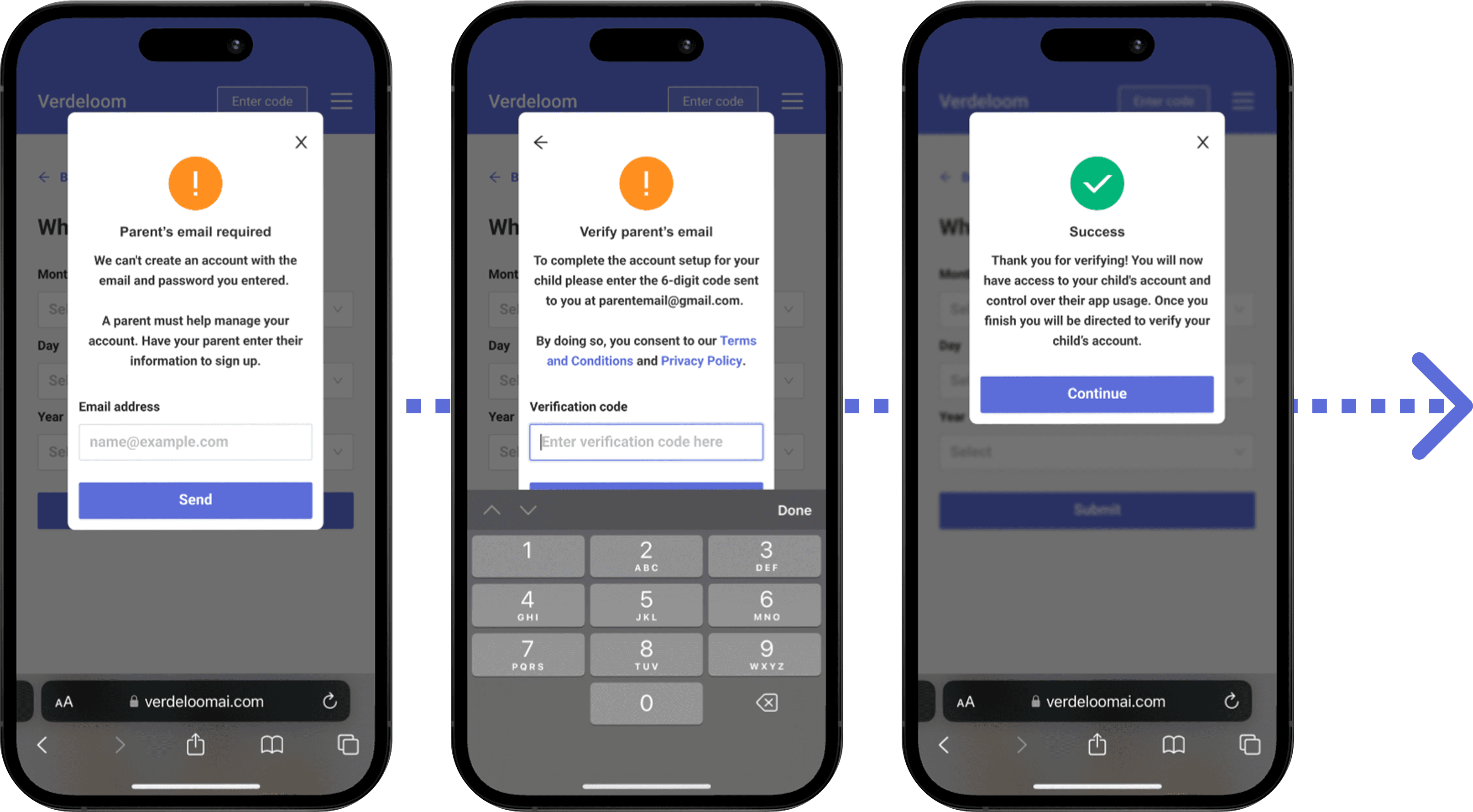
Separate flow if user is 13 yrs or younger
Created a separate flow to comply with local laws and ensure parental guidance, requiring parental email verification and consent for users 13 and under.
Personalization post sign-up page
Once in the dashboard, users show higher intent and minimal bounce, making it the ideal place to capture account-specific data for AI personalization through tailored prompts and messaging.
DESIGN DECISIONS
Designed a sitemap to lay out where the most optimal point is to display onboarding entry
Most users explored product sections to evaluate solutions and make decisions, making them ideal placements for onboarding entry CTAs.
Simple and efficient onboarding flow
The onboarding flow on the main sign-up area consists of 4 required section and 1 optional (additional security). These steps will all remain the same in any account type.
Personalization portion of onboarding
These personalization flows would occur after an account type is selected and contain different pages + options.
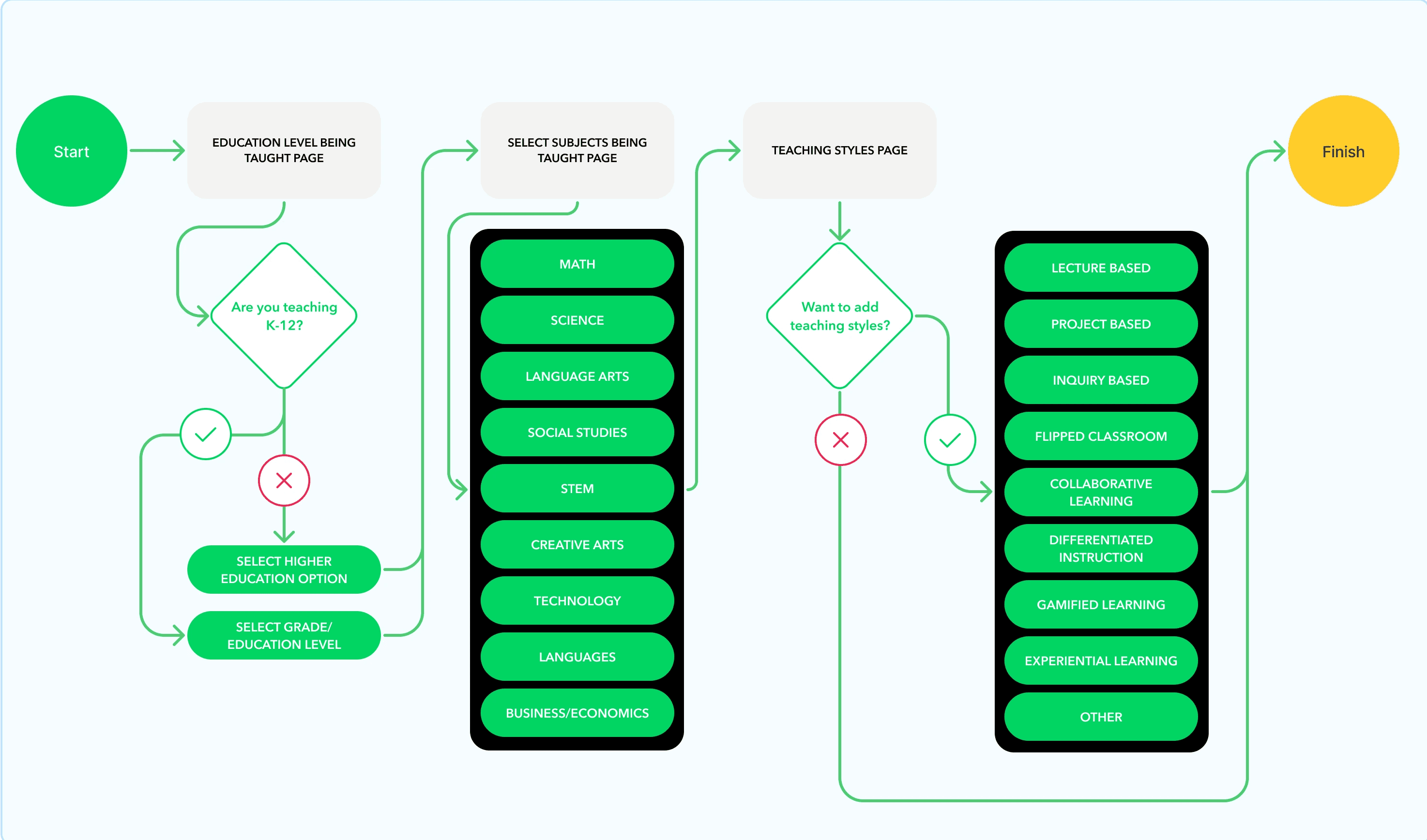
Teachers
Students
Others
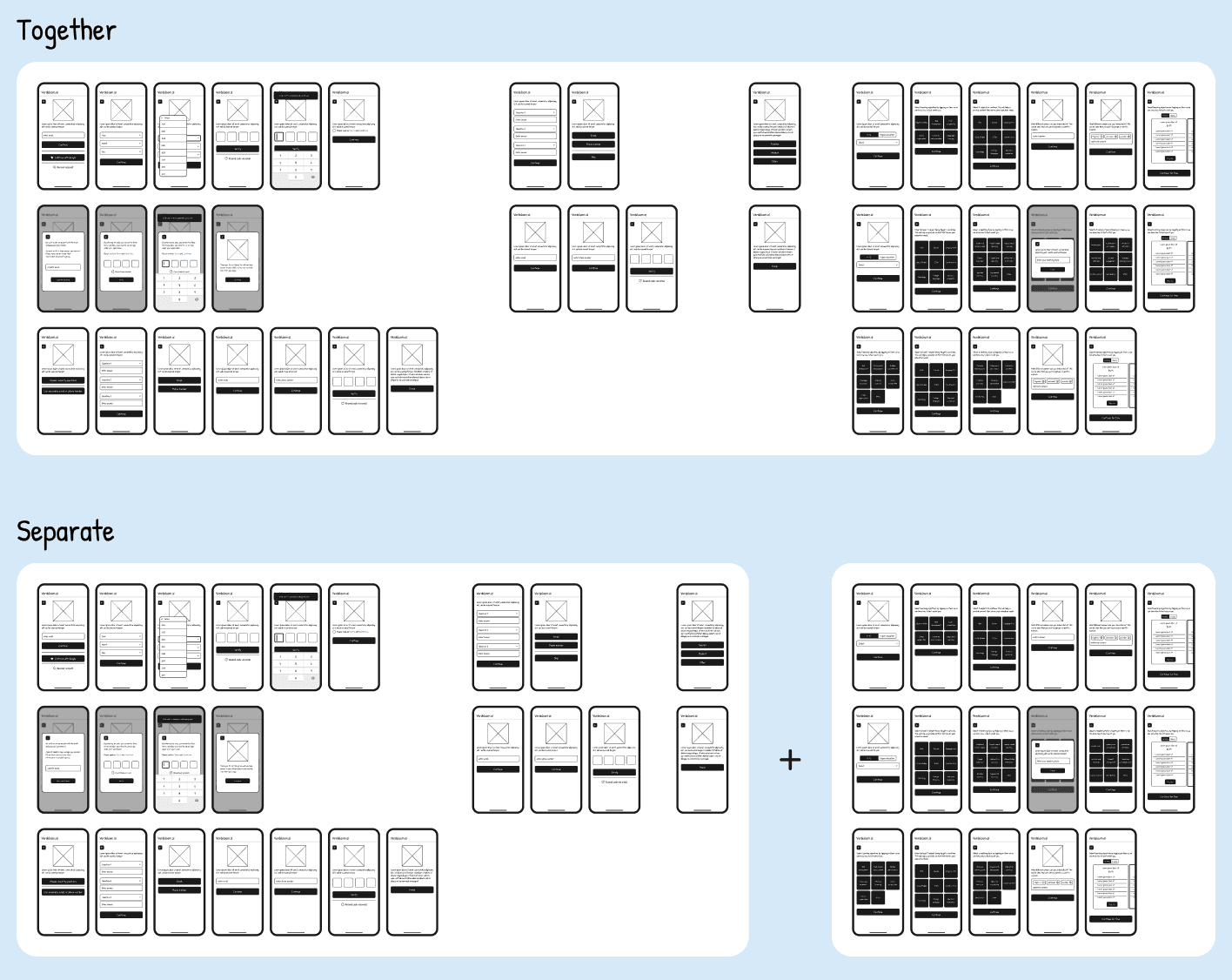
Create wireframes to A/B test long flow vs seperate
Research suggested separating personalization questions from main sign-up, which I validated through an A/B unmoderated usability test. The separated flow performed better, reducing fatigue, while the combined version made users feel overwhelmed and trapped.
OUTCOME
We decided to push the final version, splitting personalization from sign-up, leading to strong metric improvements. However, usability testing showed required post-sign-up questions felt annoying to participants, suggesting exploration of making more of them optional.
More engagement
With the placement of CTA entries outside of navigation we saw an increase of 15% into the sign-up page.
Less people were leaving during onboarding
Bounce rate dropped by 42% when completing main sign-up flow into the tool page.
Increased number of plan sign-ups
An increase of 4% to plan sign-ups was recorded (during usability testing we found people would still be hesitant to sign up for a plan without using the tool at first).
Successful use of personalization in AI tools
Use of collected data helped drive prompt recommendation features.